A2L / ASAP2 basics: CHARACTERISTIC, MEASUREMENT and COMPU_METHOD
How an ECU description file becomes a group tree and a row-per-object export.
Updated 2026-11-05
A2L is the file format of the ASAM ASAP2 standard. It describes objects inside an ECU's memory so that a calibration tool can read measurements and change parameters over a protocol such as XCP or CCP. This is a different job from DBC: a DBC file explains the signals carried by CAN frames, while an A2L file explains named memory objects, their addresses, their data types and how their raw integers become physical values. A vehicle programme typically ships both, and engineers often need to cross-reference a CAN signal name with a calibration object that produces it. The file is plain text with /begin and /end blocks, and it is normally accompanied by a binary image of the ECU software.
The top level is a PROJECT containing one or more MODULE blocks. Inside a module you find CHARACTERISTIC entries (tunable parameters that can be read and written), MEASUREMENT entries (read-only observation values), COMPU_METHOD blocks (conversion rules), RECORD_LAYOUT definitions for scalars, curves and maps, and GROUP blocks that collect references into a browsable tree. A CHARACTERISTIC usually points to a conversion method and a record layout and carries an ECU address; a MEASUREMENT similarly references a conversion method plus a bit mask or data type. Names inside the file must be identifiers: many tools tokenise strictly, so non-ASCII characters in identifiers or strings are a common source of import failures and are usually sanitised or escaped on export.
The blocks you will actually see
/begin CHARACTERISTIC SparkAdvance "Base ignition angle"
  VALUE 0x8000 ECU_ADDRESS 0x1234
  COMPU_METHOD CM_deg
  /begin REF_MEASUREMENT EngineSpeed /end REF_MEASUREMENT
/end CHARACTERISTIC

/begin COMPU_METHOD CM_deg "" LINEAR "%.4" "deg"
  COEFFS_LINEAR 0.0625 -720
/end COMPU_METHOD- PROJECT / MODULE — top-level containers
- CHARACTERISTIC — a writable calibration parameter
- MEASUREMENT — a read-only measurement object
- COMPU_METHOD — raw-to-physical conversion, unit and format
- RECORD_LAYOUT — scalar, curve, map or axis structure
- GROUP + REF_CHARACTERISTIC / REF_MEASUREMENT — the tree shown in a viewer
Conversion and units
A COMPU_METHOD is the A2L equivalent of factor and offset in a DBC signal. A LINEAR method declares COEFFS_LINEAR with a factor and an offset, plus a format string such as %.4 and a unit such as deg, rpm or bar. TAB_INTP, TAB_NOINTP and TAB_VERB methods describe piecewise interpolation or enumerated text values instead. This is why the same raw integer can represent -720 to +720 degrees in one ECU and a completely different range in another: the meaning lives in the conversion method, not in the memory cell. When a viewer shows engineering units, it has followed that reference chain from the object to its method.
Select a record type to see which viewer and export columns it fills
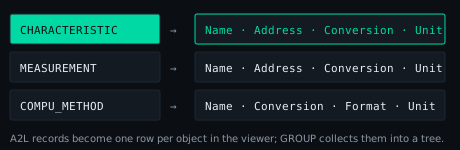
From the file to an export
Opening an A2L file in a browser viewer typically produces a group tree on the left and a record table on the right, with one row per object and columns for group, kind, name, type, address, conversion, format, min, max, unit and description. Exporting to XLSX keeps that shape: a Records sheet with one row per object plus a truncated Info sheet with file statistics and parse diagnostics. Because the parser runs locally, the calibration data — often the most sensitive artefact in the toolchain — is never uploaded. A tolerant parser also matters here: a single unknown keyword or a malformed /end should be reported as a diagnostic rather than discarding the entire file, since real ECU descriptions frequently contain vendor-specific extensions.
Try it in the viewer
Open a sample file or drop your own DBC/A2L file. Parsing happens entirely in this browser; nothing is uploaded.
Open the viewerFrequently asked questions
Is A2L the same kind of file as DBC?
No. DBC describes CAN signals in frames; A2L/ASAP2 describes ECU memory objects for measurement and calibration, usually accessed over XCP/CCP.
Why does a COMPU_METHOD matter?
It defines how an ECU integer becomes a physical value, so tools can show engineering units instead of raw counts.
Related guides
Which topic should come next? Send a short email — no forms, no tracking.